
Reports → Overview is the live dashboard for the day. Everything marked Live updates as conversations come and go, so a team lead can keep it open on a second screen.
Watch the walkthrough
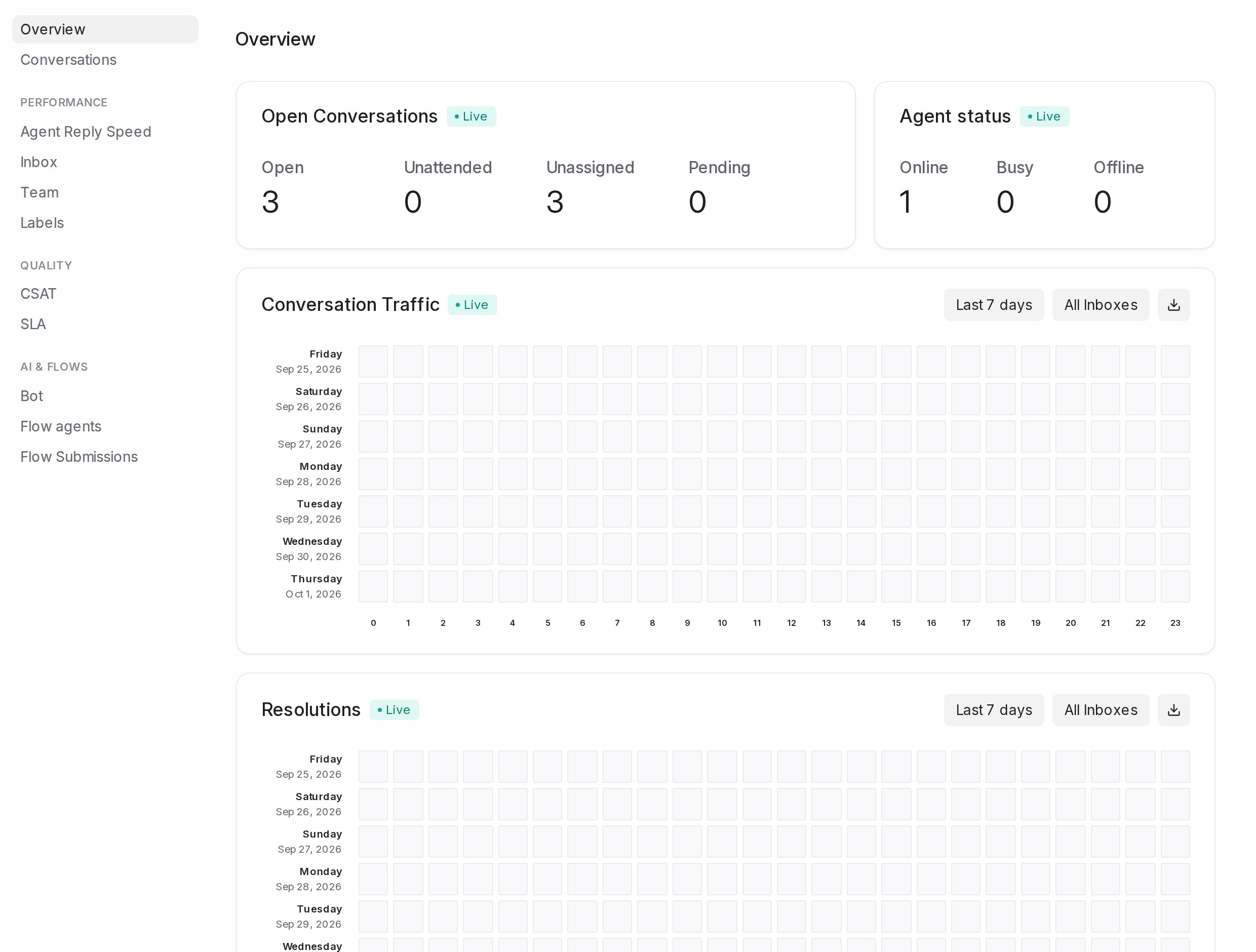
Open Conversations
Four counts across the whole account: Open, Unattended (still waiting for a first reply from your team), Unassigned (nobody owns them yet) and Pending. When Unattended or Unassigned starts to climb, someone needs to pick up.
Agent status
How many agents are Online, Busy and Offline right now. Automatic assignment only hands new conversations to online agents.
Conversation Traffic and Resolutions
Two heatmaps, one row per day and one column per hour. Conversation Traffic shows when new conversations arrive; Resolutions shows when they get resolved. Darker squares mean more. Use them to plan shifts: if traffic peaks at 9 pm and resolutions do not, you are short-staffed in the evening.
Each heatmap has its own date picker (Last 7 days, Last 14 days and more), an inbox picker (All Inboxes or one inbox), and a download button that saves the numbers behind it as a file.
Conversations by agents and by teams
A table per agent with Open, Unattended, Longest waiting, Rounds (7d), Avg reply (7d), Missed (7d) and Status, so you can see who is overloaded and who has room. Conversations without an owner are counted under Unassigned. The team table shows Open, Unattended and Status per team; pick All Teams or one team.